
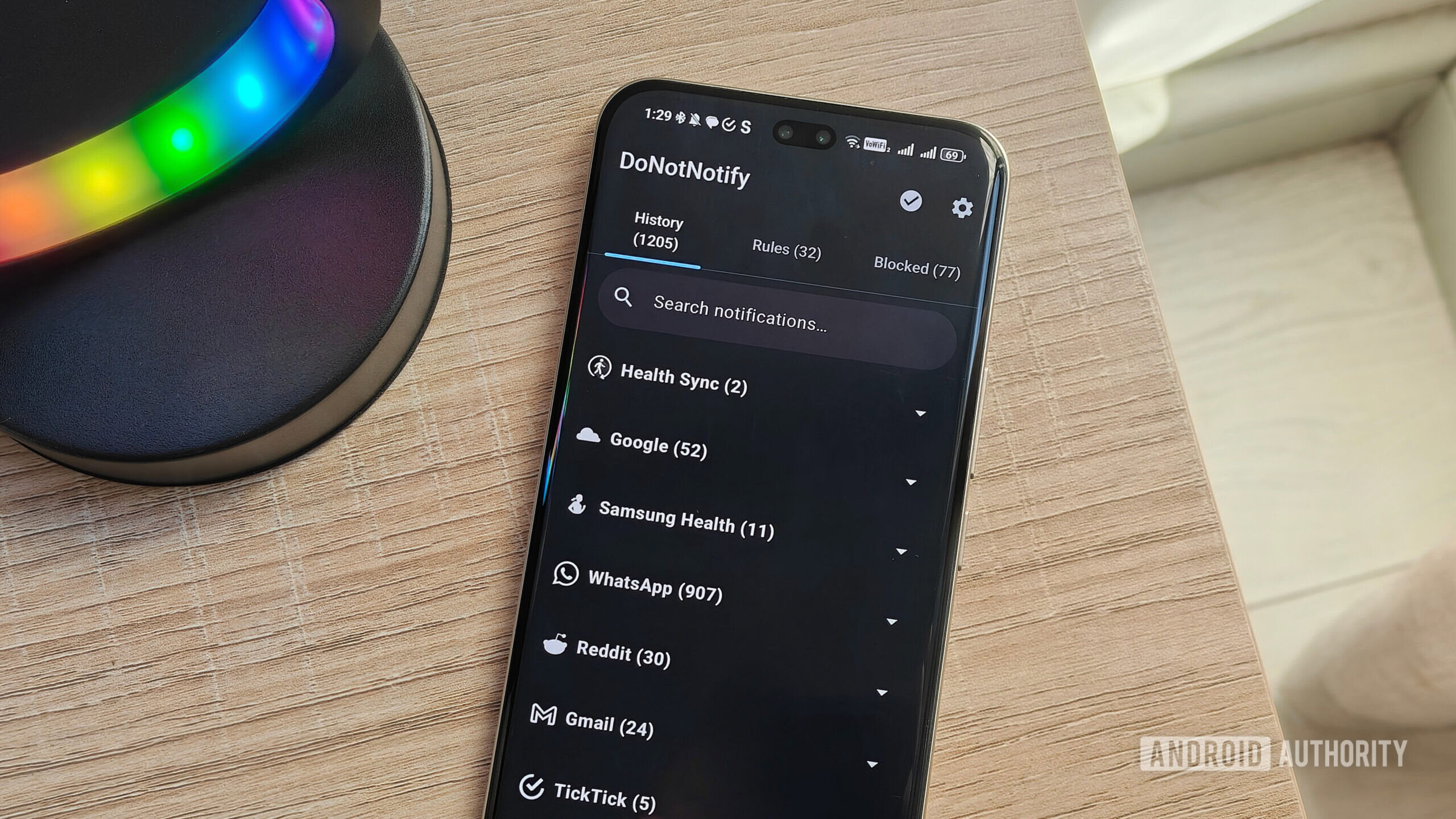
Android's notification system was supposed to give users more control. Instead, it handed that control to app developers who stuff every promotion, update, and bot ping into your status bar. DoNotNotify flips the script. The open-source app logs incoming notifications and lets you block them with app-level rules, keyword filters, and regex patterns. Everything runs on your phone. No accounts, no ads, no internet permission.
Key Takeaways
- Rule-based blocking: deny, allow, or stack notifications by app, title, or text pattern.
- Privacy-first design: the app operates offline with no internet permission and no data collection.
- Regex support: advanced users can write custom patterns to catch promotional or repetitive notifications.
- Recently updated: Google Play shows a July 16, 2026 update adding stacked-channel custom notifications.
- Trusted coverage: reviewed by Android Authority, Lifehacker, and discussed on Hacker News.
Table of Contents
- Why Android's notification system fails power users
- What DoNotNotify does differently
- How to set up rules and filters
- Privacy tradeoffs: notification access vs on-device processing
- What's new in the latest update
- The adoption vs trust paradox
- How to choose
- Frequently asked questions
Why Android's notification system fails power users
Android introduced notification channels in Android 8.0 Oreo. The idea was solid: apps could group alerts into categories, and users could mute each channel individually. In practice, many apps treat channels as a suggestion. They create dozens of channels for every type of promotion, game event, or social ping. Casual users get overwhelmed. Power users get annoyed because the granularity they want doesn't exist.
The settings menu doesn't help much. You can swipe a notification away, but you can't tell the system \"only let through messages from people I know\" or \"block anything from this app that contains the word promo.\" That's where notification managers come in, and DoNotNotify is one of the few that actually works.
What DoNotNotify does differently
DoNotNotify sits between your apps and your status bar. When a notification arrives, the app logs it in a History tab and applies whatever rules you've set. You can block an entire app. You can allow an app but block specific text in the title or body. You can even use regex to catch patterns.
The interface is straightforward. The setup wizard walks you through giving the app notification listener access and battery optimization override, because Android likes to kill background apps without warning. Once configured, you'll see incoming notifications populate the History tab in real time.
The app's rule system supports three actions: deny, allow, and stack. Deny drops the notification before it reaches the status bar. Allow lets it through. Stack groups matching notifications instead of showing them individually, which reduces clutter without losing history.
This matters because Android's built-in snooze is primitive. It groups all notifications from an app into a single snoozed bundle. DoNotNotify's stack feature lets you define your own grouping logic based on content rather than source.
How to set up rules and filters
The practical workflow from Android Authority's hands-on review is representative. After setup, open the Rules tab and create a new rule. Choose the app, set the action (deny, allow, or stack), and optionally add title filters, text filters, or regex patterns.
In practice, most users start with broad deny rules. Block shopping apps like Temu, block games like Pokemon Go that push event notifications, block bot pings from Discord. Then they allow list the apps they actually want: messaging, email, calendar. Regex is where the tool becomes powerful for advanced users. A pattern like promo|deal|% off|limited time catches promotional language across any app.
One quirk: as of early 2026 testing, the app didn't ship with pre-built rules. You had to build your own deny list from scratch. That's not a flaw — your notification tolerance differs from mine — but it means the first hour with DoNotNotify is a bit of work. If you already use privacy-focused Android tools like FUTO Swipe, this setup should feel familiar.
Privacy tradeoffs: notification access vs on-device processing
DoNotNotify requests NotificationListenerService access. Android treats this as a sensitive permission because it lets the app read every notification that passes through the system. In the wrong hands, that's a privacy hazard. DoNotNotify's developer says the app is purely on-device and internet-free.
On Hacker News in January 2026, the developer answered questions about data handling and confirmed the app has no internet permission. The Show HN thread reached 347 points and 168 comments, with users asking for an F-Droid release and network access controls. A GitHub repo exists at anujja/DoNotNotify. You can inspect the code yourself rather than trusting a black box.
The privacy policy, as reported by Lifehacker, claims zero data collection. For an app that sees every notification, that promise matters. If you're going to hand over notification access, you need to believe the app isn't uploading your data. An open-source codebase is the strongest signal a developer can offer. Users can audit what the app actually reads.
If your concern is \"I don't want any app seeing my 2FA codes or banking alerts,\" then DoNotNotify might not ease your mind. It sees everything temporarily to decide whether to block it. For most people, the local-only model is sufficient trust. For highly sensitive notification contexts, you might prefer a narrower allowlist approach. We've seen similar tradeoffs with other open-source Android tools like LibrePods, which also asks for system-level permissions while keeping processing local.
What's new in the latest update
Google Play shows a July 16, 2026 update for DoNotNotify. The release notes mention custom notifications for stacked notification channels. Before this update, stacked notifications were a single group. Now you can define custom handling for stacked channels, which should let users preserve individual app identities while still reducing barrage volume.
The app currently lists \"1,000+\" installs on Google Play. It's categorized under Tools. The listing claims no ads, no accounts, no tracking, and offline operation. Version 5.15 appeared on APKPure around the same time frame. The Play listing was updated recently, which suggests active maintenance rather than a dead project.
The adoption vs trust paradox
DoNotNotify has traction among privacy-conscious Android users. It appeared on Hacker News, Android Authority, Lifehacker, and Dev.to within a six-week span starting January 2026. The Dev.to write-up framed it as a productivity and digital-focus tool, noting that the F-Droid review process validates security and code quality.
But adoption doesn't mean widespread. The \"1,000+\" install count on Google Play suggests early adopters, not mainstream users. Most Android owners don't know notification channels can be managed this closely. They don't install notification managers. This mirrors the pattern of many open-source Android tools: beloved by enthusiasts, unknown by the general public. We've documented similar stories in open-source Android apps, where passionate communities often outpace mainstream awareness.
The trust signal here is genuine. Open source, offline-first, reviewed by multiple outlets, and actively maintained. The risk is that the maintainer burns out or the project stalls. DoNotNotify isn't backed by a large company. Its sustainability depends on one developer's continued interest and community contributions.
How to choose
DoNotNotify is worth trying if:
- You're tired of shopping, gaming, and social apps crowding your status bar
- You want precise control over notifications beyond Android's built-in channel toggles
- You prefer locally processed tools over cloud-connected apps
- You're comfortable installing via Google Play or waiting for an F-Droid release
Skip it if you want pre-built rules out of the box, or if you're uneasy granting notification access to a third-party app. The setup requires a few minutes of tinkering. The payoff is a cleaner notification stream that respects your attention.
Try DoNotNotify on Google Play if you want to reclaim your notification stream. Check the GitHub repo for the latest updates and community feedback.
Related Reads
- Claude Fable 5 Access Extended Through July 19: What It Means for Developers
- GPT-5.6 Sol Goes Public: OpenAI's Flagship Breaks Government Review
- Meta Muse Spark 1.1: Meta's First Paid AI Model
Frequently asked questions
Is DoNotNotify really open source?
Yes. The source code is available on GitHub under the anujja/DoNotNotify repository. The developer confirmed on Hacker News that the app is fully offline with no internet permission.
Does DoNotNotify collect my data?
According to the developer's privacy policy and statements on Hacker News, DoNotNotify does not collect data. The app has no internet permission and operates entirely on-device. As always with notification access, review the permission screen and source code if you have specific privacy concerns.
Will DoNotNotify stop seeing my notifications once I set rules?
Yes and no. DoNotNotify needs notification access to evaluate incoming alerts against your rules, but it does not store or transmit them. The app processes them locally and drops or passes them through based on your configuration. For the most sensitive notifications, consider the tradeoff between control and access.
Is DoNotNotify on F-Droid?
As of mid-2026, DoNotNotify is distributed through Google Play and APKPure. F-Droid users have requested a release on Hacker News and other forums. Check the GitHub repository for updates on F-Droid availability.
References
- Android Authority — hands-on review, July 9, 2026
- Hacker News — Show HN thread, January 5, 2026
- Lifehacker — app overview, January 13, 2026
- Dev.to — productivity framing, February 14, 2026
- Google Play — store listing, July 16, 2026
- GitHub — repository
- APKPure — version listings




0 Comments